Sunday, September 19, 2010

Sign Language and SRS

I have just stumbled on to the work of Rick Morris, in particular his use of the one handed American sign language in his regular classroom.

To paraphrase, Rick gets his students to use the signs for "I" (for I have a question), "A" (For I have an answer), and "C" (for I have a comment), when they their hands. In a small group this lets him prioritise his dialogue with his students and helps with the flow of his lesson. He has added more sign language in his classroom to help with other management issues.

This has to be one of the most useful and practical teaching techniques I have seen in a long time and I'm keen to try it out next time I'm training a group.


How dose this relate to clickers?


One thing that many people forget is the "?" button on many Student/Audience Response Systems. On TurningPoint it silently but visually cues up people who would like to ask a question or make a comment - the teacher/trainer/lecturer at any time can pull up the list and see who is next to ask their question or to comment.
If you use Responseware, those questions can also be written by the participant so that in large groups they don't have to stand up and be heard (embarrassing for some and logistically difficult with AV and large rooms).

Sunday, September 12, 2010

Computer Tutorials

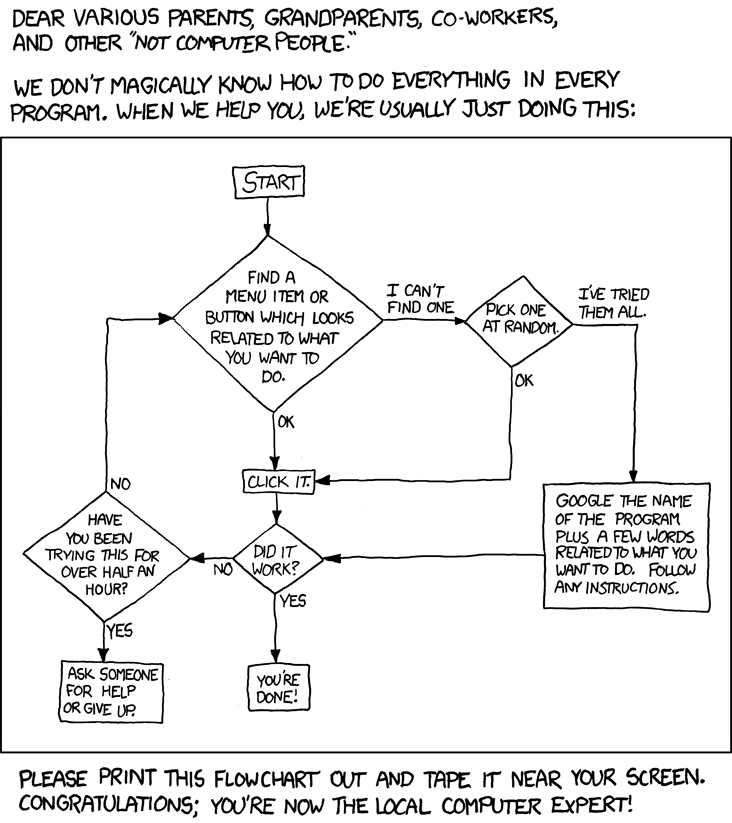
From XKCD.com - so very true.


So often someone will give me a mobile phone and say - "You're a techie/computer person can you fix this for me?"

I wish I had this in my pocket to give them.

Sometimes though some people do really want to learn, but you just don't have the time to help them every step of the way.

I learn best through a combination of tutorials, pictorials and project based or problem solving. So if you have someone who wants to learn "computers" try pointing them in these directions.

There are some good JAVA and .net tutorials as well.

http://www.homeandlearn.co.uk/index.html

http://www.techtutorials.net/index.html

http://inpics.net/index.html - I like this one becase it has step by step pictures.

http://www.baycongroup.com/tutorials.htm

Tuesday, September 7, 2010

free online room planner


One of my "stumbleupons" came up with this: roomfulexpress

It's an online room / space planner.

This would be a great way to map out your classroom or school office and it works nicely with IWB's. Gives your students the overhead perspective on things.

It also has some nice outdoor objects, prints without logging in doesn't save unless you set up an account. Also all measurements are in feet and inches - so a maths activity to convert to metric would be in order.

Wednesday, August 25, 2010

The IWB upgraded


We have seen this coming but I didn't think it would be quite this soon...

Samsung has released a 64" touch panel that when you look at TCO and intallation costs would give most interactive whiteboards a run for the money...


From their website...

The exciting new 650TS touch screen for education is a must have for any classroom. Combining the simplicity of a whiteboard and the power of a computer, the Samsung 650TS eBoard will enhance almost any learning environment. The exciting new 650TS touch screen will increase student participation, provide better visual presentation and therefore create a better learning environment. The 650TS eBoard occupies less space than other interactive boards. It has low power consumption and can even deliver high-quality images under the brightest lighting condition. The lifespan of the 650TS LCD panel is approximately 50,000 hours (or about 30 years when used 6 hours a day).


Not exactly portable as an eBeam and projector set up. But certainly for a fixed installation this is the next step in providing display and interactive technology in the classroom.

For more information -

The cool thing is that we now sell them from our office. Can't wait to get my hands on a demo unit.


Enhanced by Zemanta

Wednesday, August 18, 2010

Making your own iwb content

Seems I've taken a holiday from my blog...

Unfortunately I wasn't on holiday... I've been working harder than ever before at my current job as well as a few home projects which I'll show later when I get them a bit further along.

I had an author contact me recently - she was looking for a way to create here own interactive whiteboard resource to go with some picture books that she has written.

Now back in the day I used to use Authorware, Director and Flash to generate interactive multimedia, but that is now over 10 years ago and I have not kept up my skills.

So I went on the hunt for easy to use cheap/free tools to create stand alone multimedia packages that included basic computer based training stuff like quiz es, cloze, matching and drag and drop type activities.

So here is what I found

CourseLab - This is the system we are going to use. Nice interface, no coding if you don't want to and easy to use. Best of all it's free.LAMS Authoring EnvironmentImage via Wikipedia

LAMS - more server based but again easy to use and set up - Free too

Xerte - More coding than what I would like - but would be really good once you get your head around.

eXe - Easy to use but not enough "fun" stuff for our purposes (storybook), but for secondary and tertiary courses this is very quick and easy. Again free.


Enhanced by Zemanta

Tuesday, July 13, 2010

Ebeam demonstration Video

I find this a little funny but is seems that SmartBoard is getting to be a generic term...

This comes from www.smartboardsreviews.com

It's good once again to see customer using our products and being able to get going so quickly.

I like his closing comment.


Monday, July 12, 2010

ARS/SRS in Higher Education

Queensland University of Technology has released a "Take5" video on the use of keepads in their Business studies courses. It's nice to see one of our clients working with the technology to get better outcomes for their students.

A lot of what she says can be used within a primary and seconday based environment as well.


Enhanced by Zemanta