Monday, August 22, 2011

Art History - a Free Interactive Text Book


One of the few classes I really enjoyed at school was art - I was lucky enough to do it all through high school. Didn't mean I was actually good at it but at least I was having a go.

As part of that formal art education we had to study art history and I we had a decent library of Art History at school and even a few good books at home...

Then travelling through Europe and the US for three years I was able to see many of the works in person, from the Louve, Prado, Tate, Metro, to little galleries like the Beaverbrook in Fredricton.


So I was drawn to see the SmartHistory.org website - maybe I just stumbled across it.
It is a fantastic resource. If your like art or even if you don't there is enough in there to en-thrall. Set up like most art history text books it goes through each stage of art and how it influences the way we see the world and how how artists have changed our perceptions of art.

Friday, August 19, 2011

3D from Photos - free


Another stumble that I put into favourites...

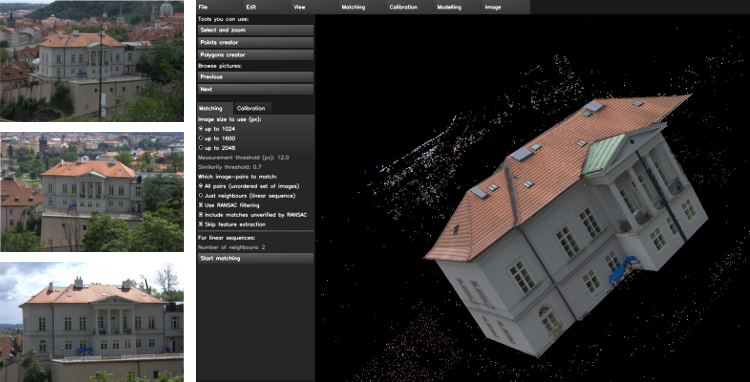
Insight 3D turns multiple photos into a 3D image - and it's free. Similar to Microsoft PhotoSynth, it uses point clouds to build up the image. Bur the great thing it is that it is on your computer - not on the cloud. Looks like a lot of fun - something I will have to put on my own computer to try out.

Imagine taking some phots and then being able to show it in 3D.


Wednesday, August 3, 2011

Amazing website and resource

One of those stumbleupon gems...
Water Life - Produced by the national film board of Canada it is the story of the great lakes. But it is the creative design of the website and atmosphere of the site that is absolutely amazing. Sometimes I just have the music going in the background. Brilliant user interface that is both original and fun to explore without being so esoteric that you cant get back to the beginning.

If you want to see how a multimedia site should be done - this is a great example of some super Flash animations and interactions.

Learning areas - Science, SoSE, Maths, and as a great example of digital media.

Wednesday, July 20, 2011

Free School digital signage


Digital Signage - You may have seen it in a shopping centre or airport. It's the LCD screens theatre in public spaces, that show information and advertising. Many schools are also starting to use digital signage - from the front desk at administration for parents to see or in other areas like staff rooms and common rooms.

The issue is that the systems and software that run these screens is usually fairly expensive and are not easy to use.

Recently I cam across this company - MediaSignage.com - They have developed a cloud based solution so you can update your signage from anywhere and set up your screens anywhere there is an Internet connection and power.

So why am I blogging about this on an educational technology blog? We for starters it means that you can turn your interactive whiteboard over to live streaming news and information of your choosing - with tickers and RSS feeds coming in live. It is also free so you can do a school project setting a system up with your students - it's like making your own "hotel" style information channels. Grab some old computers and old TVs and screens and start creating a digital signage network for peanuts.

Friday, July 15, 2011

600 science questions with researched distractors


The American Association for the Advancement of Science has just completed a 10 year study with 150 000 students. They developed a range of 600 science questions that test the fundamental understanding of key science topics. Each question has been researched with each distractor designed to identify misconceptions, and also includes statistics collected through their study.

Put these questions into TurningPoint2008 you can quickly and effortlessly diagnose your class misconceptions and helping you to differentiate your instruction.

You will need to register but for the effort you get a great reward.


Friday, July 8, 2011

Awesome Oresome - free resources on well... resources.


I've been busy for a while so I haven't had a chance to update my blog - this came to an embarrassing head today as I directed people to my blog after doing a training session with them and realised it had been almost 2 months since I updated it or added something new.

A friend of mine sent me this one - useful to those here in WA who are dealing with one of the biggest mining booms in this state.

Oresome - a website of resources for the minerals and energy industries. With a range of interactives and printable resources this could be a great base for a unit on the mining and resources sector.

Thursday, May 19, 2011

Free SLR Camera - sort of.

As part of my media class many moons ago we would give the students a go with the schools' one and only SLR camera. I only had basic knowledge of it and passed on something about depth of feild and the rest but like all film cameras - how are you supposed to know what settings you took when the prints come back weeks later (I worked in a remote country school).

With the new digital cameras - even the DSLR's there is a tendancy to leave it up the the camera to work out the best settings for fear of missing the moment.

I've just stumbled across "CameraSim" a virtual SLR that we showe you in an instant what setting will effect what in the photo.